Catalyst · Security
Data Access Control
Enterprise-grade access controls that moved Catalyst upmarket
Summary
Built Catalyst’s Access Control system, creating a platform that other engineering teams could extend to provide customized access to data and product features, unblocking the product’s move upmarket.
Shipped two complementary frameworks:
- Account Permissions, which lets admins restrict each user’s data visibility across the entire system to a defined subset of customer records;
- Feature Permissions, a configurable system any Catalyst engineering team uses to add restricted-access UX to their features.
Sequenced the work deliberately to validate the contract before scaling it: built the framework with zero features attached, wrote the runbook, then used it to ship the first restricted-access UX, dogfooding the integration path before handing it to other teams.
The main results:
- Within two weeks of GA, 10 of 10 top customers by ARR had activated Account Permissions with custom settings.
- Three enterprise deals the previous system couldn’t have supported closed the following quarter.
- Other engineering teams adopted the platform a standard to ship their own restricted features, starting with Note Templates the quarter after launch.
The Context & Problem Space
Catalyst was originally designed to serve Small and Medium Businesses, and access control reflected that: the system offered three user roles (Admin, Member, Viewer) and basic field-level permissions, with little ability to customize beyond that.
As Catalyst moved upmarket, this became a commercial blocker: larger customers (including publicly traded or pre-IPO companies like Carta and others) needed granular control over who could see which Accounts, who could access which features, and who could read or write which Fields. Without it, Catalyst couldn’t support enterprise data governance requirements, and several deals were stalling or churning as a result.
The mandate was to design and ship a foundational Access Control system that other Catalyst engineering teams could build on top of, covering three dimensions admins needed to govern:
- Accounts (records a.k.a. objects) - which customer records a user can see at all
- Features of the system - which parts of the product (or actions) a user can access
- Fields (a.k.a. attributes) - which data points a user can read or write
Approach
The Account Permissions initiative was already in progress when I picked it up: it was on POC stage with a partial design and unclear long-term vision. Instead of continue building, I paused to re-validate the assumptions: was the demand real enough to justify the remaining investment, and was the planned scope the right one?
First of all, I explored the demand. Partnering with Sales and Customer Success teams, I built a list of customers who were affected by this gap in access control: their adoption was hindered, renewal at risk, or expansion blocked. Big names like Meltwater, NTT, Drata, and Attentive came up from this analysis, which gave me both a credible revenue estimate and a candidate pool for design partners. I cross-referenced this against Salesforce data on Opportunities lost in connection to permissions and data privacy. Finally, I gathered sentiment from Solution Engineers, who confirmed that while access control rarely surfaced in early sales conversations, it was a frequent late-stage blocker for larger deals. The combined picture justified continued investment, and gave me a defensible scope ceiling for V1.
In parallel, I audited what Catalyst already had: three default user Roles (Admin / Member / Viewer) and Field Permissions tied to those Roles. The adoption was poor (most customers kept default settings) due to significant upfront labor investment in setup combined with ongoing maintenance as the system evolved, that didn’t justify the impact.
These weren’t just adoption problems to solve in marketing; they were design constraints. Whatever I built next had to be low-touch by default and stay useful as configuration drifts over time.
From this, three strategic decisions shaped my approach:
- Build on the existing Roles concept rather than introduce a new primitive. Admins were already familiar with Roles, and extending them was lower-risk than asking customers to learn a new mental model.
- Run Account Permissions and Feature Permissions in parallel. They served different (although complimentary) use cases, had different design partners, and could be released independently. Splitting the team allowed me to compress the timeline without overloading either track.
- Defer support of Identity Providers (a.k.a. IdP such as Okta or Azure) integration to a later stage. It would meaningfully ease admin maintenance, but it wasn’t a blocker for the design partners I’d identified, and didn’t provide much value for the initial setup. Including it would have pushed the release past the window where the revenue was at risk without much benefit for any of the early adopters.
I worked through the architectural implications with engineering before locking the scope, so the tradeoffs were a shared decision rather than a handoff.
Execution
The Account Permissions and Feature Permissions work ran in parallel but had similarities at the fundamental level:
- Both extended the existing User Role primitive (rather than introducing a new one).
- Both enforced authorization through existing Pundit-based pattern (no new tech)
- Both are frameworks for other engineering teams to use (not a standalone feature).
I partnered with engineering on the technical architecture and with design on the UI patterns, which were straightforward to adapt from existing settings flows. The harder problems were on the backend:
- The system had to be genuinely secure (not just hide UI elements).
- Scale as the number of roles and restricted features grew.
- Be usable enough that other Catalyst engineering teams would actually adopt it when building their own restricted features.
To pressure-test the architecture against those requirements, I facilitated a series of cross-engineering sessions before locking the design. The goal was two-fold: to surface edge cases, and to get an explicit buy-in from engineering leads on other teams who would eventually be consumers of the frameworks.
Feature Permissions
To address these problems, I designed Feature Permissions as a two-part system: a configurable permission level applied per-Role for each restricted feature (Everyone / Specific Roles / Admins Only), and a framework that other Catalyst engineering teams could plug their own features into.
Rather than build the framework and the first feature together, I sequenced them deliberately: build the framework with no features attached → write a runbook for adding a feature to the framework → use the runbook to add the first feature. This let me dogfood the runbook before handing it to other teams, and it meant that when another team eventually adopted the framework for their own feature, they were following a path that had already been validated end-to-end.
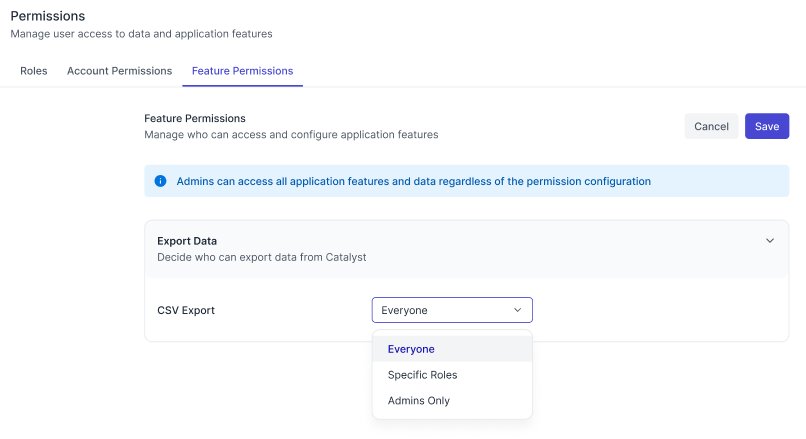
The first feature added to the framework was CSV Export. I picked it for four reasons:
- Clear use case with zero edge cases — exporting data is a discrete action, not a stateful experience
- No ongoing maintenance after the initial release
- Easy GTM communication — “you can now restrict who exports your data” is a one-line value prop
- Confirmed demand — Drata, among other customers, had explicitly asked for the ability to limit CSV export
One subtle decision was how to handle defaults:
- For existing customers, the default had to be “Everyone” — anything else would silently take away access they’d previously had.
- While for new customers, “Admins Only” was the right default, in line with the Principle of Least Privilege.
The split preserved backward compatibility for the existing base while setting up new customers with secure defaults from day one.
By design, the framework was built so that any Catalyst engineering team could add their own feature to it without my team’s involvement — they owned their feature, and they owned its access control configuration. This was the contract that made the framework a platform rather than a service.
Account Permissions
Account Permissions let admins define a set of Accounts (an Account Set) using filters on any Field, and grant access to that set to specific User Groups, or individual Users. Multiple sets might be assigned to a given user (say, “EMEA region” and “Strategic accounts”), in which case their access is the union of all assigned sets.
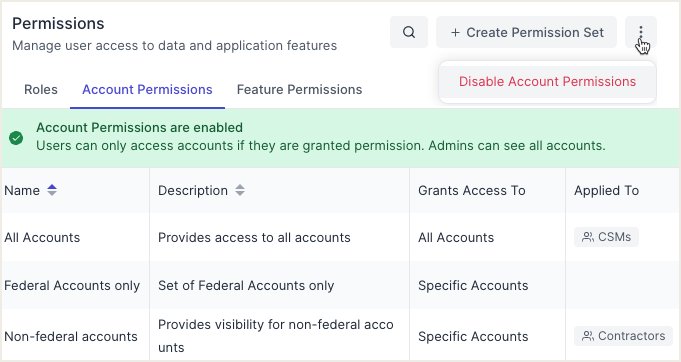
The guiding principle in designing the restriction mechanism was that limitations had to be real, not just cosmetic: users only have access to Accounts assigned to them. Any Accounts outside that set disappear from Catalyst entirely: Search, Explore, Hierarchy tree (up or down the hierarchy level), segment results - everywhere.
If the feature is not completely airtight, its entire value collapses.
User flow: Setup
The entire setup is done on the admin side, users will gain/lose access immediately after changes applied.
First, the admin creates a new Account Set and chooses its scope:
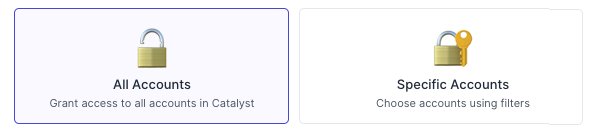
Admin picks the scope of the new Account Set
Next, they define the filters — picking Fields and conditions that determine which Accounts belong to the set:
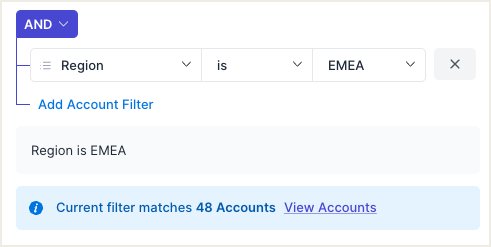
Filters define which Accounts belong to the set; a live count confirms the match
Finally, the Account Set is assigned to Users and User Groups:
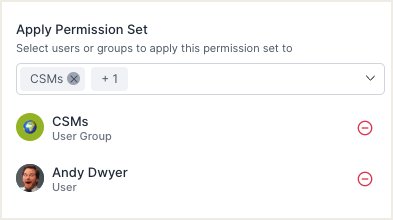
Users and User Groups receiving access to the new Account Set
Edge Cases & Decisions
Account Permissions touches every part of the product, which made edge cases the dominant focus of design. Working with Solution Architects, Support, and engineering leads, I sourced the realistic scenarios where the system could behave ambiguously, then made an explicit product call on each.
Conflict between Account Permissions and Field Permissions. Account Sets are defined by filters on Fields. However, a user might not have read access to one of the Fields used in the filter that grants them their access. The original engineering proposal was to compute the Account Set ignoring Field Permissions; this would have been more flexible, but it created a path for users to indirectly infer values of Fields they couldn’t read. I chose to add a requirement for affected users to have at least Read access to any Field used in their Account Set’s filter, and built UI checks that flag this conflict whenever an admin changes Account Permissions, Field Permissions, User Groups, or Roles — across UI, API, or IdP. The tradeoff was less flexibility for V1 in exchange for closing a real security hole.
Multiple Account Sets per user. Users can be assigned multiple Account Sets (e.g., a user in the “EMEA” group and the “Strategic” group). The options were: give the user a choice of which Account Set to use, Union, or Intersection. I chose union logic: the user sees Accounts that belong to any of their sets. Switching between sets introduced unnecessary friction. Intersection would have created unexpected system behavior (the admin adds a new set to a user, but the user can’t access new data, since it’s not included in some other set assigned to that user previously). At the same time, union logic matches how admins think about granting access (each set adds visibility), and thus is the most logical option to build.
No Account Set assigned. If a user has no Account Sets assigned to them (admin removed the only Account Set a user had; or the user is excluded from a group through which an Account Set was assigned), that user loses access to all data rather than reverting to unrestricted access. This was the strict interpretation of Principle of Least Privilege: explicit grants only, no implicit fallback. The alternative (defaulting to “all Accounts” when no set is assigned) would have been more forgiving but would have made it possible to accidentally give users full visibility through misconfiguration.
Impact & Outcomes
10 of 10
Top customers (by ARR)
activated Account Permissions within 2 weeks of GA
3
Enterprise deals closed
previously unsupported by the old system
The closed beta was praised by design partners and immediately unblocked one customer’s expansion conversation, doubling a six-figure contract.
Within two weeks of General Availability, Account Permissions was adopted (activated with non-default settings) by 100% of Catalyst’s top 10 customers by ARR.
Customers who had previously cited access control as a compliance blocker (publicly traded, or pre-IPO companies that are subject to SOC2 and GDPR scrutiny) confirmed to the Customer Success team that the feature unblocked their use of Catalyst for sensitive data. While Catalyst didn’t pursue certification as part of this release, the feature directly enabled customers’ own compliance posture.
The Feature Permissions framework became Catalyst’s standard pattern for adding access control to new functionality. The first downstream adoption was the introduction of access control to Note Templates - built and shipped by another engineering team using only the runbook. This validated the framework as a platform.
In the quarter following release, Catalyst onboarded three major enterprise customers whose use cases the previous system could not have supported, attributable directly to this initiative.
Key Takeaways
Permission systems carry asymmetric risk. A bug that hides too much from a user is annoying; a bug that hides too little is a data breach. That asymmetry shaped most of the design decisions on this project: closed beta before GA, Principle of Least Privilege as the default, Field Permission tradeoff (steered clear from a vulnerability at the cost of admin flexibility). In retrospect, treating the asymmetry explicitly as a design constraint was the single most useful framing I carried through the project.
What I’d do differently (and what I wouldn’t). The most valuable use case I couldn’t ship in V1 was dynamic filtering - letting admins create Account Sets with rules like “CSMs only see Accounts where the assigned CSM is themselves,” or “managers see everything assigned to their direct reports,” or “CSMs see all Accounts where the Region matches theirs.” It was technically harder than static filtering: the filter engine had to evaluate values at request-time rather than admin-configure-time, and the system had to reconcile two different data types (for example, a free-text “CSM” field on the Account with a structured Catalyst User identity). Given what I knew at the time (uncertain demand, unknown engineering lift, a hard deadline), deferring it to V2 was the right call. But what I learned in the months after release was that the value was higher than my estimate suggested, and a surprising number of customers reached for scenarios that we’d considered “low priority”, “nice to have”, or “edge case” during scoping. If I were running V1 again, I wouldn’t necessarily ship dynamic filtering (given the engineering lift), but I would invest more in uncovering the assumptions (explicit or hidden) the design partners are making when sharing about their use cases. The learning is about process, not outcome - I’d make a better-informed call, not necessarily a different one.