Self-built tools

About
Tools I built to solve my own problems, then cleaned up so other people can use them. Each one is free and open source.
You don't need to be a developer to run them. Open an AI assistant (Claude, ChatGPT, or Gemini), paste the prompt, and it walks you through setup one step at a time. It handles the technical parts; you provide your content.
Casebook Kit
Build your own portfolio and case-study site by chatting with an AI.
A starter kit for a portfolio and case-study website. You answer a few questions in a chat with an AI assistant and end up with a live site you own and host for free. This very site runs on the same code.
I built it after setting up my own site, then pulled out everything personal so the structure could be reused. The assistant handles the GitHub and terminal parts, so the only thing you bring is your work.
Read the SKILL.md file at https://github.com/peselev/casebook-kit and then guide me through setting up my own copy of this site, one step at a time. I've never used a terminal or GitHub.
When to use it
A good fit if you want a site you fully own that loads fast and reads well to both people and AI crawlers. If you'd rather edit everything in a visual drag-and-drop tool, or you need a blog with comments or a store, a hosted builder like Squarespace or WordPress will fit better. For a single graphic or a one-page bio, Canva or LinkedIn is less work.
Technical details
Built with Astro and Tailwind; the output is static HTML hosted free on GitHub Pages or Cloudflare Pages. Every personal detail lives in a single config file, and case studies are Markdown (MDX), so the guided setup only has to edit one file plus your content.
The site generates its own llms.txt, sitemap, and
structured data for search and AI discovery, and ships a
SKILL.md that an assistant reads to guide a non-technical
person from a fresh copy all the way through deployment. It includes a
set of case-study components (callouts, metric grids, click-to-enlarge
images, pull quotes), two worked example cases, and a writing guide that
keeps drafted content sounding human rather than machine-generated.
Applywright
An agentic job-application pipeline you run on your own machine.

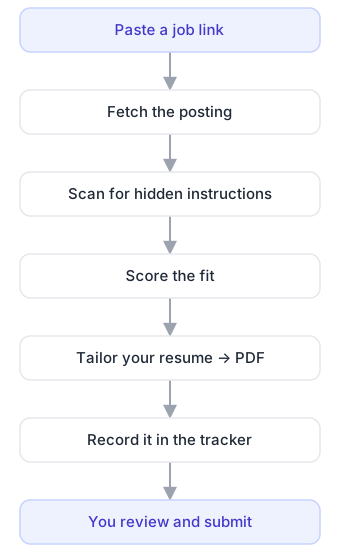
You paste a job posting's link and the agent handles the repetitive part of applying: it reads the posting, scores how well you fit, tailors your resume to the role, exports a clean PDF, and logs the application in a tracker. You review what it produced and submit. You can also queue up many postings at once and let it work through them.
I built it for my own job search and use it daily, then separated the engine from my personal data so it could be shared. One detail I care about: it treats every job posting as untrusted text and scans it for hidden instructions before acting on it, because a posting is content from the internet, not a trusted command. Your resume, your bullet library, and your applications stay on your machine.
I'm evaluating this tool for my job search and want to understand it before I install anything: https://github.com/peselev/applywright
You're running in the browser, so let's do the parts that work here and leave the local setup for the end.

1. Clone the repo and read through it (the README, CLAUDE.md, and the skills). Then explain in plain terms:
  1. how the pipeline works end to end
  2. how the per-posting personalization works
  3. what's clever about it
  4. what I'd be signing up for as a user
2. Then talk it through with me: ask what my job search looks like, and help me judge honestly whether it's worth my time.
3. If I decide to go ahead, set me up by following the SETUP-WITH-AI guide and the orientation skill you just read, doing the browser-side parts first the way those guides describe.

Don't invent anything about me: ask for the real details, and mark anything I can't answer as TODO.
When to use it
A good fit if you're applying to a lot of roles and want each resume tailored to the posting, your applications tracked, and cover letters drafted in your own voice. It runs through Claude Code on your machine, so you install a small toolchain first — there's also a lighter browser version to try it without installing anything. If you apply only occasionally, or you'd rather use a hosted tracker like Teal or Huntr or LinkedIn's built-in tools, those are less setup.
Technical details
Built for Claude Code and runs locally with Python, pandoc, and Typst
(no Python package dependencies). The engine — workflow skills, helper
scripts, and Typst resume templates — contains none of your data;
everything personal lives in a gitignored profile/ folder
and is read at runtime, so the engine can be published or forked
freely.
Job postings are scanned for prompt-injection in two passes, a mechanical scan and a semantic read, before the agent acts on them. Fit is scored against a tagged library of resume bullets, and the two best-matching bullets are swapped into the resume along with a per-application tracking tag on your portfolio link. Applications are recorded to a CSV by default (or Notion), with duplicate postings skipped automatically. Cover letters and application-form answers are drafted on request using a strict set of anti-AI-tell writing rules. A browser-only mode lets you try the same flow through claude.ai without installing Claude Code.